Free forever · v1.0 out now

Capture the whole page.
Not just what fits.

A full page screenshot extension for Chrome that actually finishes the job: one click scrolls the page, stitches every frame, and keeps the sticky header from printing itself down the middle of your image. Crop it, mark it up, export PNG, JPEG or PDF.

  • No account
  • No tracking
  • Works offline
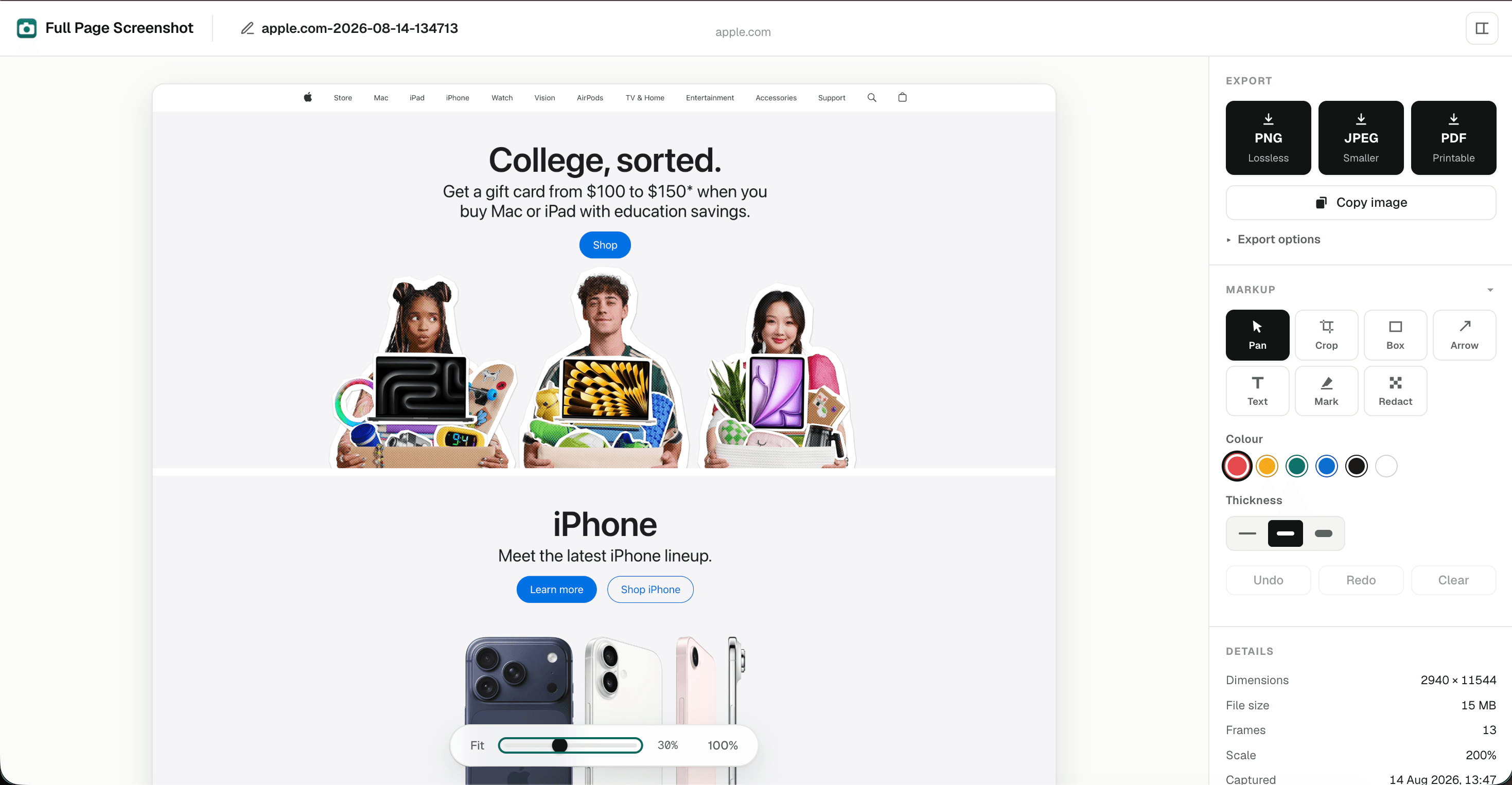
Screenshot preview
The Full Page Screenshot editor: a captured page on the left, with export buttons for PNG, JPEG and PDF and the markup tools on the right.
  • Chrome
  • Edge
  • Brave
  • Arc
  • Vivaldi
  • Opera
  • Manifest V3
  • No servers
  • Zero dependencies

The hard parts

Full-page screenshots break in the same few places.

Every one of these is a thing that went wrong first, then got fixed.

The sticky header, dealt with

A nav bar pinned to the viewport gets photographed in every frame, so it ends up striped down your screenshot at regular intervals. The band is measured once and left out of every frame after the first. Same treatment for cookie bars and chat bubbles.
It cannot read the sites you didn't ask about

No broad host permissions, just activeTab, granted per click and expiring on its own. No servers, no analytics, no network requests of any kind.

Read the privacy policy

1.4MB

A typical PDF export. Not five.

A capture at 2× DPI is routinely 50 megapixels, and no quality slider saves you from that. The embedded image is resized instead, and page geometry still comes from the original, so the document never shrinks with the file.

App-style pages

Mail clients, dashboards, feeds: anything that scrolls an inner pane instead of the document. Most tools hand back one screen. This finds the pane that actually scrolls and walks that.

Crop, annotate, redact

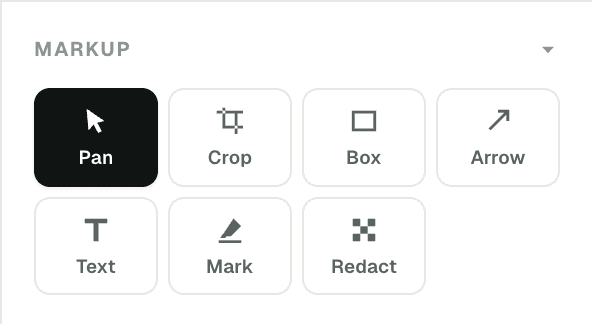
Arrows, boxes, text, highlighter, and a redaction tool for whatever you don't want to send. Edits are stored as data and baked in only on export, so the original capture is never touched.

The markup toolbar: Pan, Crop, Box, Arrow, Text, Mark and Redact.

One click. No panel first.

The click is the command. Progress rides on the toolbar icon, clicking again cancels, andY does the same from the keyboard.

Out in whatever shape you need it

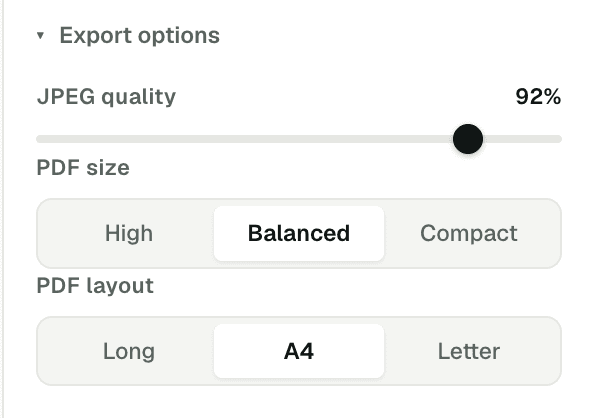
One click per format. PDFs come out as a single long page or paginated onto A4 and Letter. Or skip the file entirely and put it straight on the clipboard.

Export options: JPEG quality at 92 percent, PDF size set to Balanced, and PDF layout set to A4.

How it works

Three steps, and you configure none of them.

  1. 01

    Click the icon

    On whatever page you want to keep. There's no panel to open first, and clicking again mid-capture cancels it.

  2. 02

    It scrolls and stitches

    Scroll, settle, capture, draw, release, frame by frame to the bottom. Lazy images load on the way down because of it.

  3. 03

    Preview, then export

    The preview opens on its own. Copy to clipboard, mark it up, or download PNG, JPEG or PDF.

Prefer a panel before capturing? Turn off Capture on toolbar click in Options and the popup comes back.

Free, and staying free

Add it, and get on with your afternoon.

I built this because every other tool I tried either striped the sticky header down the page or wanted permission to read every site I visit. This one does neither, and no part of it sits behind a paywall. If it saves you an afternoon, a coffee is a lovely way to say so; the extension is finished either way.

Nitesh

Questions

The things people ask.

Something not answered here?

hello@fullpagescreenshot.in
How do I take a full page screenshot in Chrome?

Install a full page screenshot extension and click its toolbar icon, or use Chrome's built-in command: open DevTools, press Ctrl+Shift+P or Cmd+Shift+P, type screenshot and choose Capture full size screenshot. The built-in method exports PNG only and does not scroll the page first, so lazy-loaded images below the fold can come out blank.

Is Full Page Screenshot free?

Yes, entirely. There is no premium tier, no account and no upsell. Capture, cropping, annotation, redaction and PNG, JPEG and PDF export are all included.

Why does my full page screenshot repeat the navigation bar?

A sticky or fixed header stays glued to the viewport while the page scrolls, so it is photographed in every frame and stitched in at regular intervals. This extension measures that pinned band once and never sources those pixels from any frame after the first, so the header appears exactly where it belongs.

Can it capture logged-in pages, or pages that scroll inside a pane?

Yes. It photographs the page your browser has already rendered, so logged-in views work. On app-style pages such as mail clients and dashboards, where the document itself does not scroll, it finds the element that actually scrolls and walks that instead of returning a single screenful.

What data does it collect?

None. It makes no network requests of any kind, has no servers and no analytics, and asks only for the activeTab permission, which grants access to a single tab in response to your click. Captures are stored in your browser and deleted after 24 hours.

Is this an alternative to GoFullPage?

Yes. GoFullPage was removed from the Chrome Web Store in August 2026 over a copyright complaint its developers say was made in error. Full Page Screenshot gives you the same one-click capture, with the annotation editor and PDF export included rather than sold as a premium tier. There is a side-by-side comparison, and a rundown of what actually happened.

Guides

Everything about capturing a whole page.

The methods, the tools, and the parts that break, written while solving each of them to ship the extension.

All guides

Support the work

There's no paid tier. There is a coffee.

No paid tier, no ads and no analytics also means no revenue. This gets built on evenings and weekends, and it stays free either way, but if it saved you an afternoon, a coffee is what puts the next thing in motion.

  • Keeping every feature free: editor, redaction and PDF export included
  • The domain, and the hours it takes to keep up as Chrome changes
  • The next small tool, built the same way

Entirely optional. Nothing is withheld from anyone who skips it.

Buy me a coffee

Choose your own amount. The form opens right here, and there's no account to make.

Open the coffee form

Nothing loads from buymeacoffee.com until you click.